When most of viruses’ effect on pen drives, it hides the files or folders that exist on pen drive. In this case you can't see your important files or folders on pen drive. To un-hide effected folders or files on pen drive, all you have to do is follow these simple steps.
STEP 1:
Plug your pen drive to USB port of your computer. Make sure it is detected.
STEP 2:
Start command prompt by Click Start>>Run or pressing windows key+R on keyboard and type cmd then hit enter.
STEP 1:
Plug your pen drive to USB port of your computer. Make sure it is detected.
STEP 2:
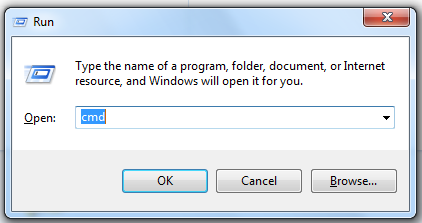
Start command prompt by Click Start>>Run or pressing windows key+R on keyboard and type cmd then hit enter.